Cinematic
MVI + Clean Architecture for SwiftUI, shown working. Cinematic is a complete movie app for iOS 26 — Swift 6, five layered Swift packages, typed throws end to end, and tests at every seam. It exists to be read: every decision is documented, and nothing is a toy stub.


| Discover | Movie detail | Discover, dark | Detail, dark |
|---|---|---|---|
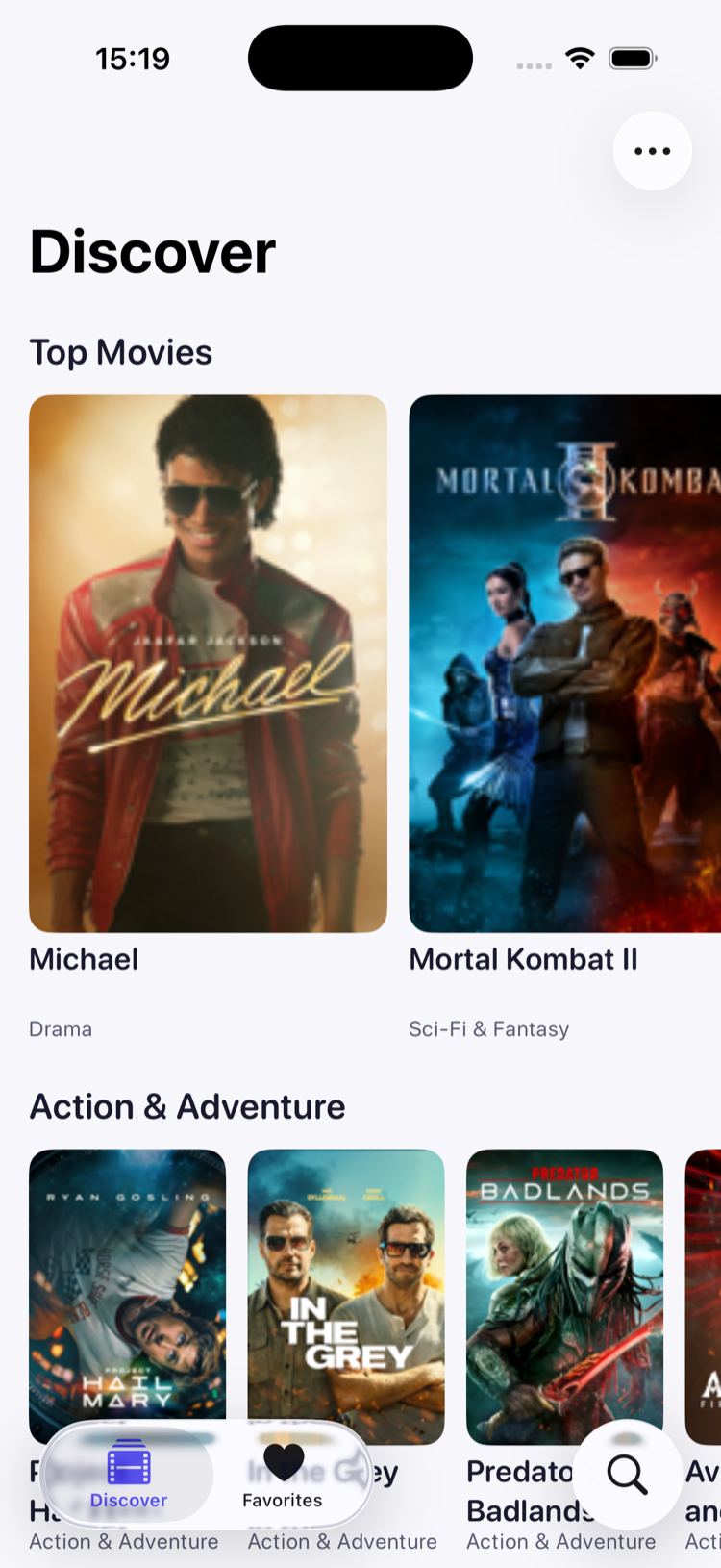 |
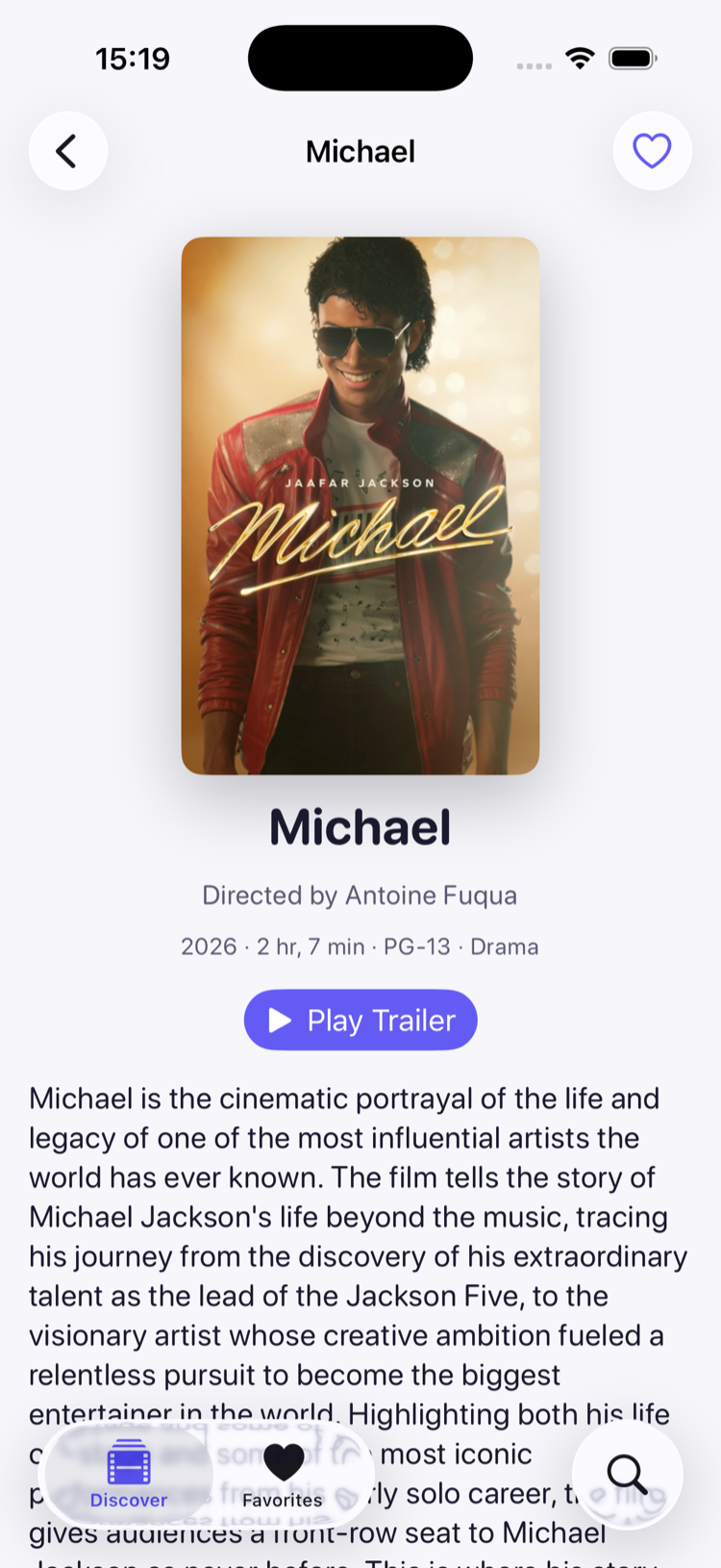 |
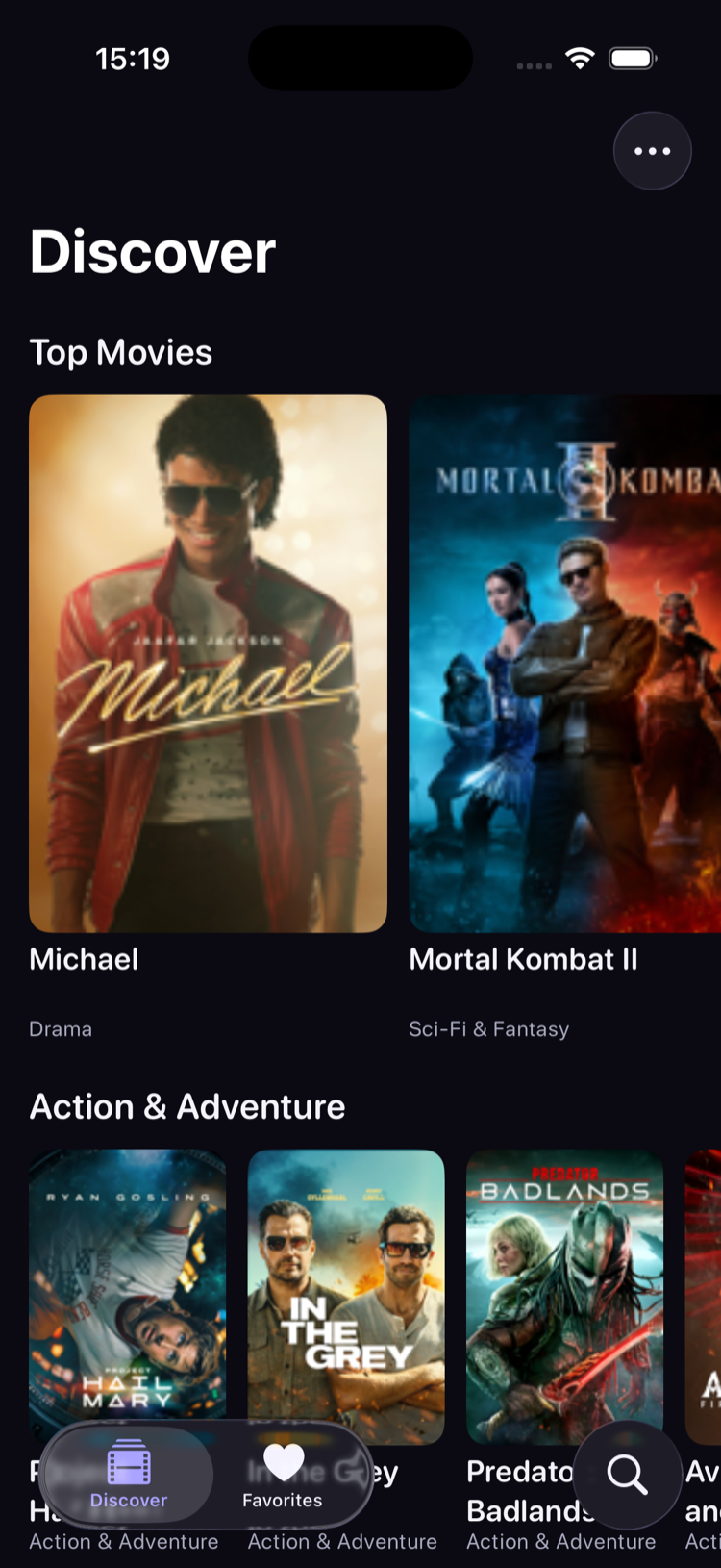 |
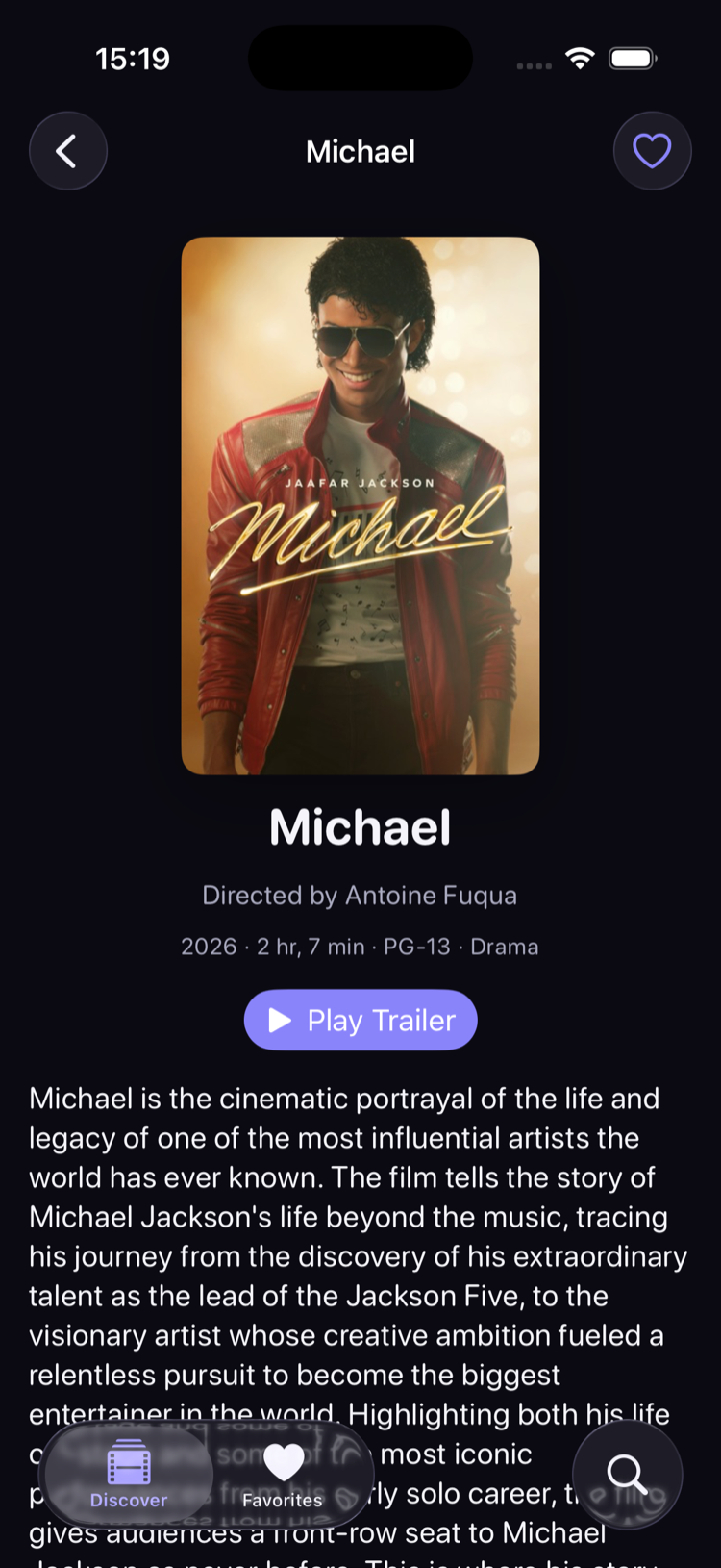 |
On iPad, the tab bar can become a sidebar and the detail screen keeps its text to a readable column:
| Discover, iPad | Movie detail, iPad |
|---|---|
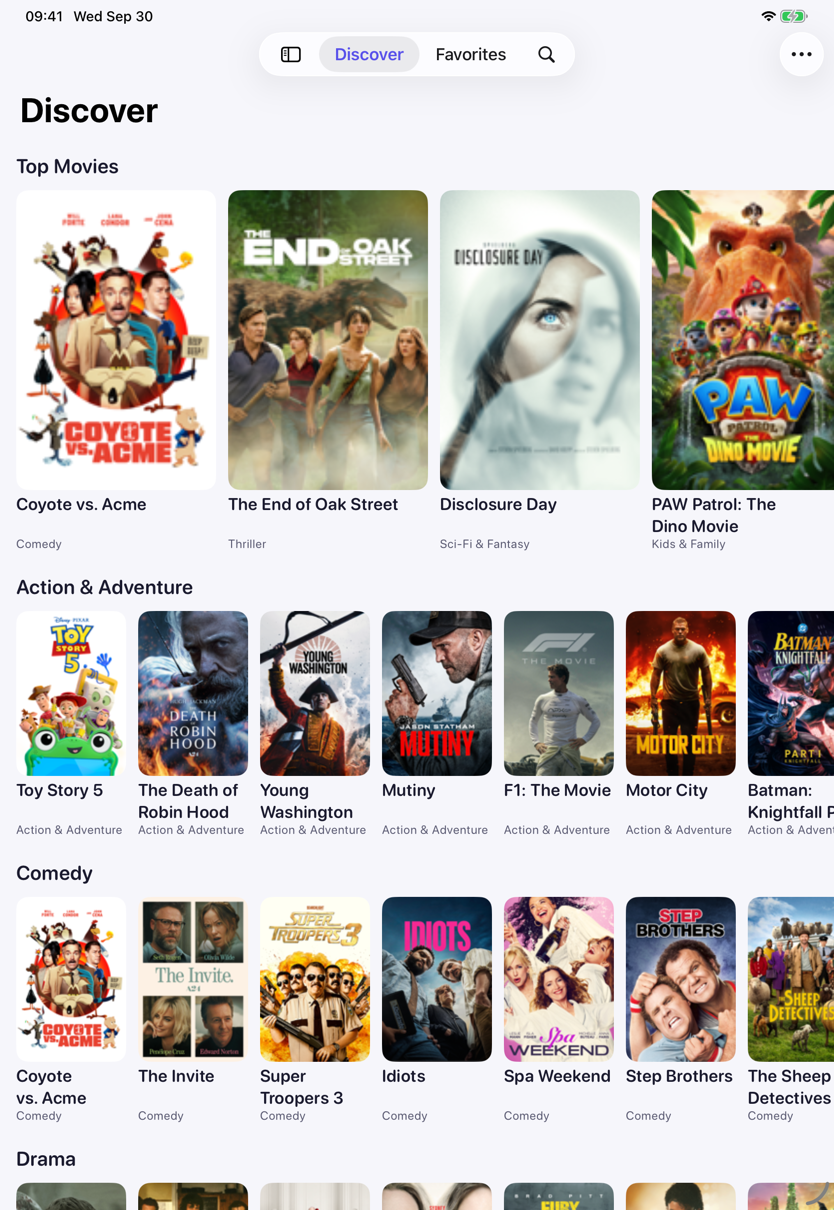 |
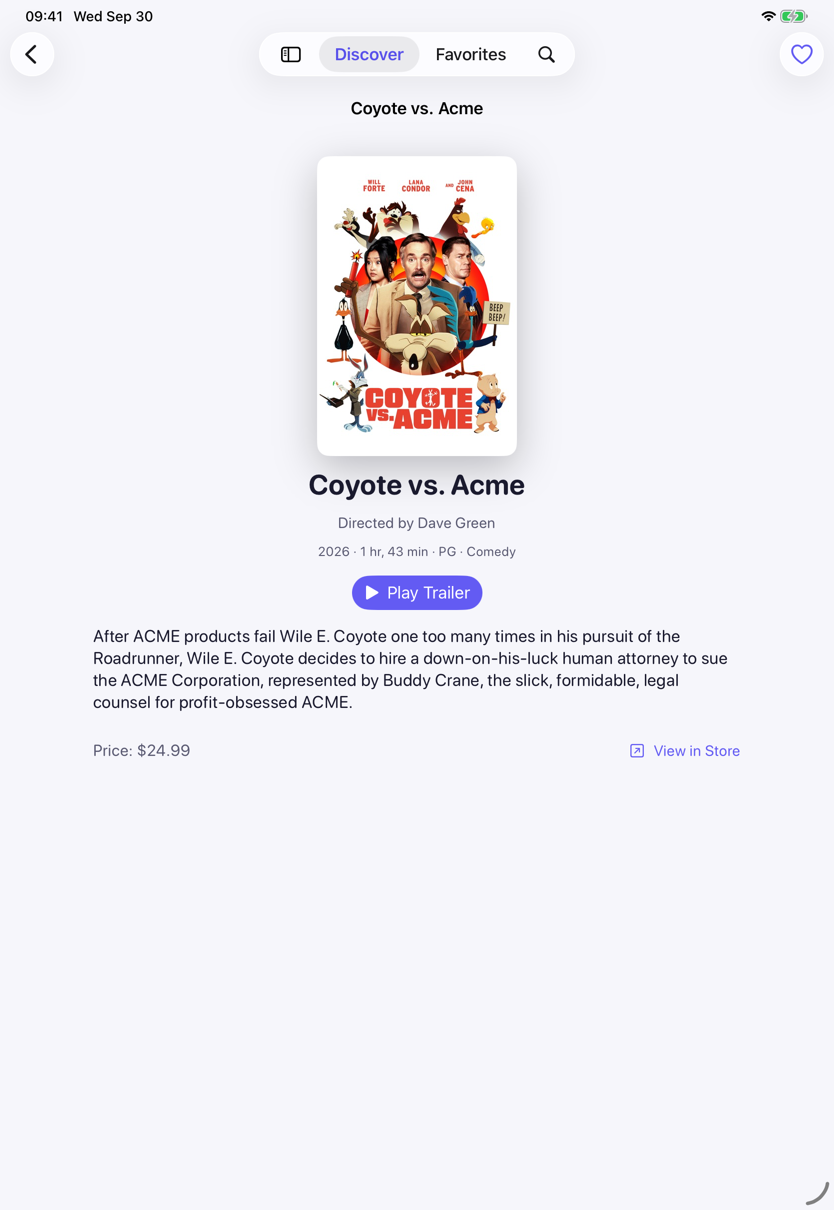 |
No API keys, no accounts, no setup. Clone, open, run — the catalog comes from Apple’s public iTunes feeds.
Read the full walkthrough on the documentation site →
Contents
- Why this repository exists
- The architecture in one diagram
- The MVI loop
- What it demonstrates
- How it compares: MVI vs MVVM vs MV vs TCA
- Quick start
- Project layout
- Documentation
- Testing
Why this repository exists
Most architecture write-ups demonstrate MVI on a counter and Clean Architecture on a diagram. The gap is the middle: a codebase small enough to read in an evening but real enough to face what production code faces — an API with quirks, caching, cancellation, localization, accessibility, error states, and tests that prove the design claims. Cinematic is that middle.
The architecture in one diagram
graph TD
    App["Cinematic (app target)<br/>composition root + navigation"]
    Presentation["CinematicPresentation<br/>reducers, views, view state"]
    Domain["CinematicDomain<br/>entities, use cases, contracts"]
    Data["CinematicData<br/>API client, DTOs, repositories"]
    Design["CinematicDesign<br/>tokens + components"]
    MVIKit["MVIKit<br/>Store, Reducer, Effect"]

    App --> Presentation
    App --> Data
    Presentation --> MVIKit
    Presentation --> Domain
    Presentation --> Design
    Data --> Domain
The arrows are the whole doctrine. Dependencies point inward, and the package manifests enforce it: CinematicPresentation cannot import CinematicData because its Package.swift never declares it. Only the app target — the composition root — knows concrete data sources and injects them behind domain protocols.
The MVI loop
flowchart LR
    View -- "send(intent)" --> Store
    Store -- "reduce(&state, intent)" --> Reducer
    Reducer -- "mutated state + Effect" --> Store
    Store -- "runs Effect" --> Task["async effect"]
    Task -- "send(intent)" --> Store
    Store -- "observed state" --> View
- State — one value type holding everything a screen shows.
- Intent — everything that can happen to it: user actions and effect results, one closed set.
- Reducer — the only place state changes. Pure, synchronous, returns an
Effectdescribing async work. - Store — runs the loop, executes effects, and is the only object a view talks to.
The whole machinery is MVIKit — about 270 lines you can read top to bottom, published as its own package so you can use it in your app too. docs/MVI.md walks through every type.
What it demonstrates
- Debounced, cancellable search: one
EffectIDgives switch-latest semantics, so a stale response can never overwrite a fresh one. - Stream-driven favorites: screens observe one
AsyncStreamsource of truth, so the heart on a detail screen and the favorites tab can never disagree. - An offline decorator:
CachedMovieCatalogRepositorywraps the live repository behind the same protocol and serves the last good answer when the network fails. - Typed throws end to end: repositories throw
MovieError, reducers catchMovieError, andLoadingPhase<Value, Never>proves at compile time that local favorites need no error UI. - Honest API work: the iTunes RSS feed wraps every scalar in
{"label": …}, prefixes keys withim:, and shipsentryas an array, a bare object, or nothing — the DTOs handle all of it, tested. - Per-screen skeletons,
ContentUnavailableViewfor empty and error states, Dynamic Type, VoiceOver labels, Reduce Motion guards, and a String Catalog per module — localized in English and German, with locale-aware price and date formatting. - An automated accessibility audit of every screen, at the default and the largest text size. Its first runs found five real bugs, from a tiny hit area to card and empty-state text that truncated at accessibility sizes.
- Deep links (
cinematic://movie/<id>), a coordinator-drivenNavigationStackper tab, and UI tests that run against an injected in-memory world. - Pull-to-refresh modeled as a state distinct from the initial load, so refreshing keeps content on screen instead of flashing skeletons — and a failed refresh is non-destructive.
How it compares: MVI vs MVVM vs MV vs TCA
SwiftUI leaves room for several architectures, and the right one depends on how hard the state is. Model-View-Intent earns its keep when state is genuinely hard — concurrent loads, cancellation, multiple sources you must keep consistent. When it isn’t, a lighter pattern wins:
| Pattern | Reach for it when | The trade-off |
|---|---|---|
MV (@Observable model) |
A screen has one source of truth and little logic | View and logic blur as the screen grows |
| MVVM | You want testable view logic without much ceremony | No built-in story for side effects or cancellation |
| MVI — what Cinematic uses | State has races, cancellation, or several sources to reconcile | One reducer plus effects per feature is more structure upfront |
| TCA | A large app needs composable features and exhaustive test tooling | A third-party dependency and a steeper learning curve |
MVIKit is the smallest thing that makes the MVI guarantees true — read it before reaching for a framework, so you know exactly what a framework would buy you. docs/MVI.md goes deep on the reducer, effect cancellation, and testing.
The table is tested, not just asserted: docs/COMPARISON.md builds the same search feature as MV, MVVM and MVI, and holds all three to one behavioural test suite. It shows where each architecture keeps its guarantees, and which of them only a UI test can reach.
Quick start
git clone https://github.com/Khizanag/Cinematic-iOS.git
cd Cinematic-iOS
open Cinematic.xcodeproj
Select the Cinematic scheme and run on any iOS 26 simulator. Requires Xcode 26 or later.
Project layout
Cinematic-iOS/
  Cinematic.xcodeproj
  Cinematic/                  ← app target: composition root, navigation, About
    App/
      Navigation/             ← coordinators, Screen/Sheet/Cover, factories
      Dependencies.swift      ← the composition root
    Feature/About/
    Resource/
  CinematicTests/             ← composition + deep-link tests
  CinematicUITests/           ← XCUITest flows over the stubbed world
  Package/
    CinematicDomain/          ← entities, use cases, repository contracts
    CinematicData/            ← iTunes API, DTOs, mappers, caching, persistence
    CinematicDesign/          ← DesignSystem tokens + reusable components
    CinematicPresentation/    ← the four features, one folder each
    CinematicComparison/      ← Search as MV, MVVM and MVI, one test suite for all
  docs/                       ← the long-form documentation
Documentation
Read it all on the documentation site, or in-repo:
| Document | Covers |
|---|---|
| docs/ARCHITECTURE.md | The layers, the dependency rule, the composition root, concurrency, trade-offs |
| docs/MVI.md | Every MVIKit type, effect cancellation, bindings, testing stores |
| docs/ADDING-A-FEATURE.md | The step-by-step recipe, from use case to pushed screen |
| docs/TESTING.md | What each layer’s tests prove and how the doubles work |
| docs/COMPARISON.md | One feature as MV, MVVM and MVI, held to the same tests |
| docs/ACCESSIBILITY.md | The VoiceOver, Dynamic Type, Reduce Motion / Transparency, and localization story |
Each package also carries its own short README.
Testing
# Platform-agnostic packages — run anywhere, no simulator
cd Package/CinematicDomain && swift test
cd Package/CinematicData && swift test
cd Package/CinematicComparison && swift test

# UI packages and the app — run on an iOS 26 simulator
xcodebuild test -scheme CinematicDesign -destination 'platform=iOS Simulator,name=iPhone 17'
xcodebuild test -scheme CinematicPresentation -destination 'platform=iOS Simulator,name=iPhone 17'
xcodebuild test -project Cinematic.xcodeproj -scheme Cinematic -destination 'platform=iOS Simulator,name=iPhone 17'
Tests cover every seam: reducer state machines, use-case rules, DTO decoding against captured payloads, repository behavior over a stubbed URLProtocol, persistence round-trips, composition wiring, three black-box UI flows, and an accessibility audit of every screen at the default and largest text sizes. swiftlint --strict passes with zero violations.
Contributing
Issues and pull requests are welcome — see CONTRIBUTING.md. If this project made MVI or Clean Architecture click for you, a ⭐️ helps other iOS developers find it.
License
MIT — see LICENSE.